To send proposals or contracts for signature using the Docusign integration, you must first add Docusign signature fields to your template.
Deskworks provides three Docusign fields that can be added to proposal or contract templates:
- Docusign Sign Here Field – creates a signature field for the recipient
- Docusign Date Field – automatically records the date the agreement is signed
- Docusign Note Field – allows the signer to enter additional notes or information
These fields are inserted into templates using short codes.
Add Docusign Fields
- Go to COMMUNICATIONS > TEMPLATES
- Locate the proposal or contract template you want to use
- Click the pencil icon to edit the template
- Within the text editor, place your cursor where the field should appear
- Type {{ followed by a few letters of the field you want to add
- A list of available short codes will appear. Select the Docusign field you want from the list.
For example, typing {{doc or {{sign will display all of the available Docusign fields:
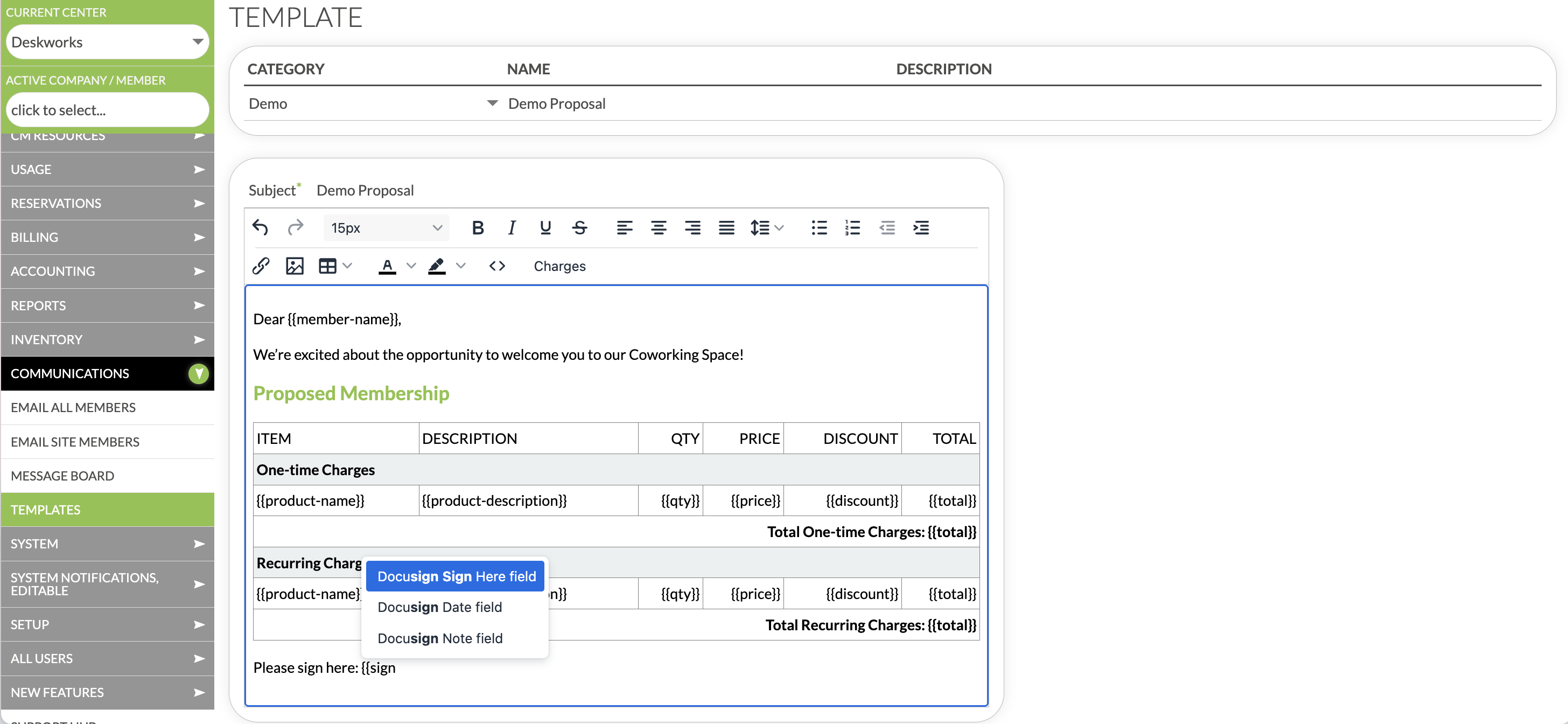
You can add multiple Docusign fields anywhere in the template.
Here is a complete list of Docusign field short codes:
- {{sign-here}}
- {{sign-date}}
- {{sign-notes}}
Save the Template
Once your fields are added, click SAVE.
Your template is now ready to be used when sending proposals or contracts for signature.
Learn how to send agreements here:
Was this article helpful?
That’s Great!
Thank you for your feedback
Sorry! We couldn't be helpful
Thank you for your feedback
Feedback sent
We appreciate your effort and will try to fix the article