To setup the InvoiceXpress Integration, contact InvoiceXpress.com and create an account. They will assist you with the setup from their side.
In Deskworks, open a ticket and request the InvoiceXpress integration.
To integrate with Deskworks:
- Login to your InvoiceXpress account.
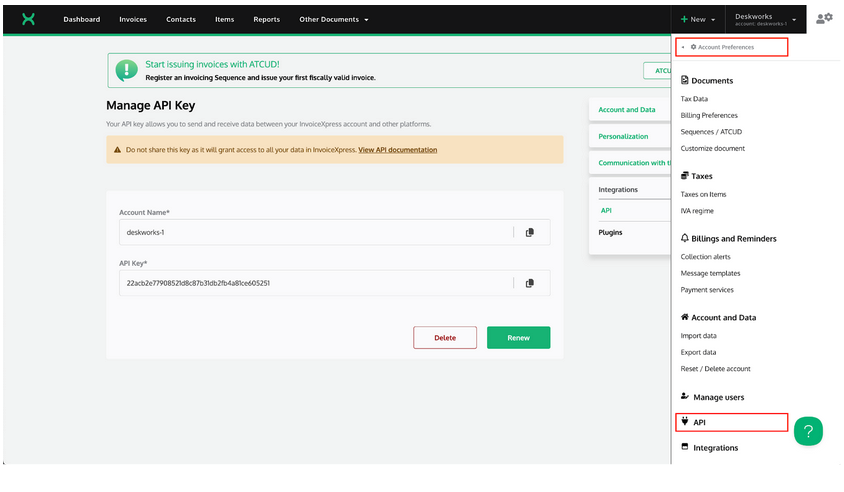
- Go to Account Preferences > API
- Create an API key if one is not already visible:
- In Deskworks, go to SETTINGS> INTEGRATIONS SETUP.
- Enter your Account Name and API Key.
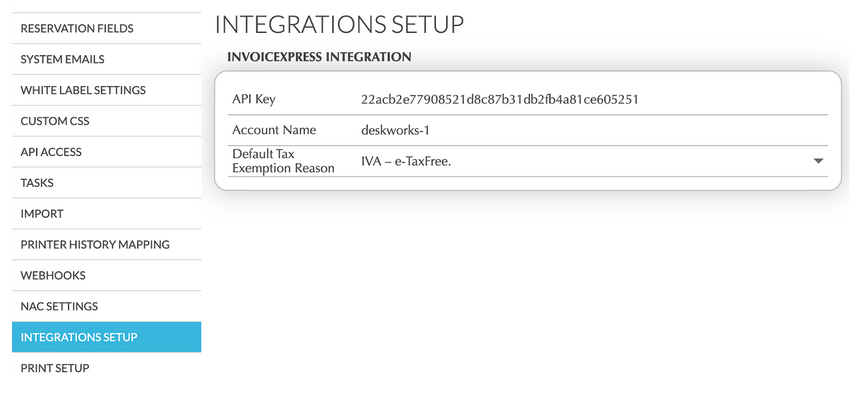
- Select a Default Tax Exemption Reason. This will be sent with any invoice that is tax exempt. InvoiceXpress can advise on the best one to use.
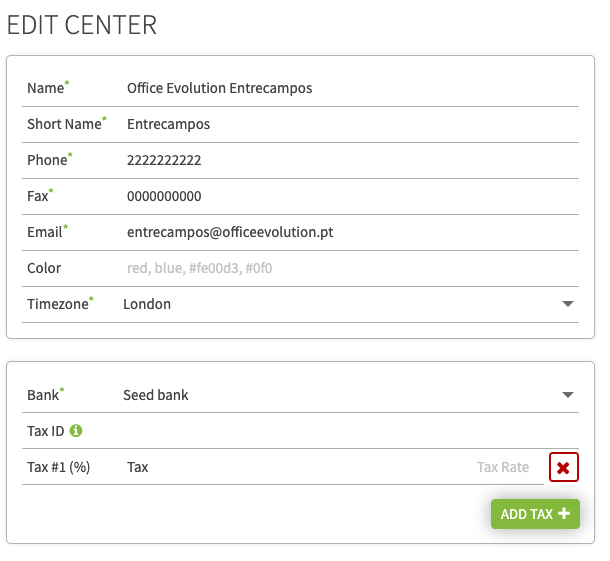
- Go to SETTINGS>FACILITY, click the EDIT button
- Be sure your Tax ID is correct
- Be sure your tax rate (or multiple tax rates) are correct. See other tax Knowledgebase articles for more information on creating and using tax rates.
- Enter your Account Name and API Key.
That's it! The integration is complete and will function automatically.
Was this article helpful?
That’s Great!
Thank you for your feedback
Sorry! We couldn't be helpful
Thank you for your feedback
Feedback sent
We appreciate your effort and will try to fix the article